Install SOLIDWORKS for students and educators
Get a personal SOLIDWORKS Design Standard for Students license: register, download, install and activate, with screenshots for each stage.
Before you start
Check your computer and permitted use
You need administrator rights, Internet access and free disk space. SOLIDWORKS 2026 requires supported 64-bit Windows 11 and at least 16 GB RAM; 32 GB is recommended. Windows Home is not supported. Check the official system requirements before downloading.
Free license for learning — The offer includes Design Standard; add-ins such as Toolbox and Simulation are excluded. It is for personal educational use, not commercial or research work. Educators can register on the form, but should check with their institution which license is required for classroom teaching. License terms
Register and get a license
Complete the registration form
Open the free license form- Email — a working personal email for the license.
- School/University Name — Bar-Ilan University.
- Country — your country, for example Israel.
- Education Level — your actual level of education.
- Field of Study — your field of study.

Accept the applicable terms
Read all four declarations under Terms & Conditions. Select them only if they apply to you and you agree, then click Next. They cover eligibility, educational use, license terms and age requirements.

Save your serial number and download
- On You’re Ready to Download, copy the Serial Number and store it privately.
- Click the blue Download button for
SolidWorksSetup.exe. The Installation Guide link downloads a PDF guide. - The license details are also emailed to the address you provided. You can proceed with the on-screen number without waiting for the email.
 License duration — The license lasts 365 days from activation. Check the expiration date shown when activation completes.
Install on your computer
Open the Installation Manager
Open
SolidWorksSetup.exeand extract the files. In SOLIDWORKS Installation Manager, select Install on this computer and click Next. Follow your institution’s separate instructions if it supplied a different license.
Enter the serial number
On Serial Number, enter your saved number under 3D Design → SOLIDWORKS Design. Leave other product fields empty, click Next and wait for validation.

Review and start installation
On Summary, review the products, installation folder and free space. Read the agreement; if you agree, select the acceptance box and click Install Now. Keep the computer connected to power and the Internet.

Finish and launch the application
When Installation is Complete appears, choose your update and participation preferences and click Finish. Restart if asked, then open SOLIDWORKS.

Activate your license
Activate the product now
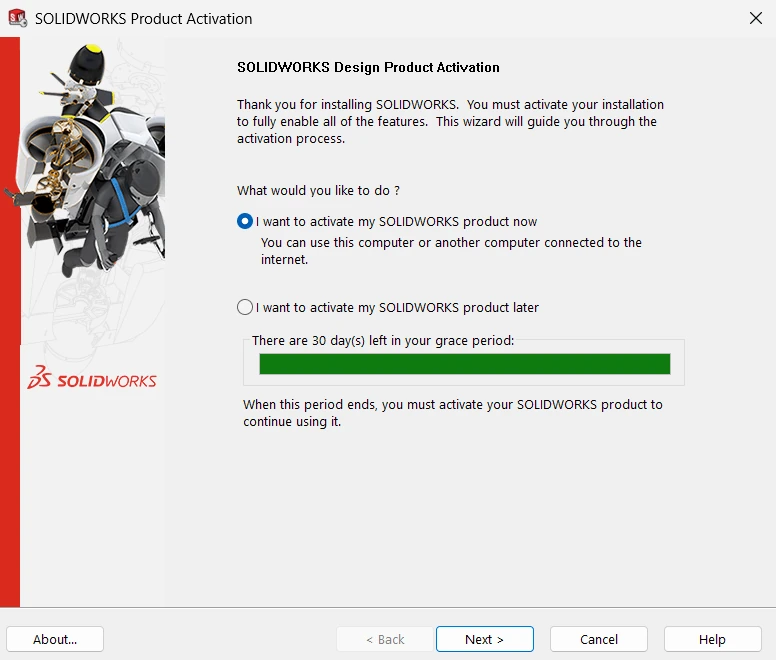
In SOLIDWORKS Product Activation, select I want to activate my SOLIDWORKS product now and click Next.
Activate over the Internet
Select the product or click Select All. Choose Automatically over the Internet (recommended), enter your email in E-mail and click Next.

Check activation succeeded
Activation/Reactivation Succeeded confirms activation. Check Expires and click Finish. You can start working.

Help and files
If something goes wrong
- No email? Check spam and the address you entered. If the registration result is still open, copy the serial number there.
- Serial number rejected? Check that you copied it completely and that it matches the downloaded version.
- No administrator rights? Contact the computer administrator. Keep your serial number private.
Updated 17 November 2026