Researcher report: how much is left in my grant
The researcher report in Anant looks different from the one you knew in the old system. Here you'll learn which number to check to know how much money is really left in your grant — for a regular budget, a closed-economy budget and a grant in foreign currency.
Can't find where to open the report? The official explanation does not say. Open a TMR request to the Research Authority and ask for access to the researcher report.
Learn the column names
The report columns have new names. Here's the dictionary between the old system and Anant:
Old system Anant What it means הקצבה מקורית (Original allocation) תקציב מקור (Original budget) The initial budget approved for the grant. הקצבה מעודכנת (Updated allocation) תקציב מבוקר (Controlled budget) The budget after changes and transfers. ביצוע בפועל (Actual spending) בפועל (Actual) Expenses and payments already taken out of the budget. שריון (Commitment) שריון (Commitment) Money reserved for purchase orders or scholarships still in process. שריון רשות מחקר (Research Authority commitment) מחקר שעבוד (Research encumbrance) A special commitment recorded by the Research Authority itself. יתרה לניצול (Available balance) יתרת תקציב (Budget balance) The money you still have left for the grant. The number you care about is almost always יתרת תקציב — the leftmost column in the report.
Scholarships — now in line 350
In the old system, scholarship commitments appeared on a separate line — line 986. In Anant this line no longer exists.
Now everything is on one line: line 350 — מלגות מתקציבי מחקר (Scholarships from research budgets). On that line you'll see the budget, what was actually spent and what is reserved (שריון) for scholarships.
Looking for 986? — You won't find it. Look at line 350 — the scholarship commitment is there, in the שריון column.Check which budget type it is
How you read the balance depends on the grant's budget type:
- Regular budget — each line (scholarships, materials, travel…) has its own balance. Look at each line separately.
- Closed-economy budget — there is one overall balance. Look only at the total line at the bottom.
The next steps show exactly where to look in each case.
Regular budget: a balance on every line
In a regular budget each item gets its own line. Its balance appears on the same line, in the leftmost יתרת תקציב column.
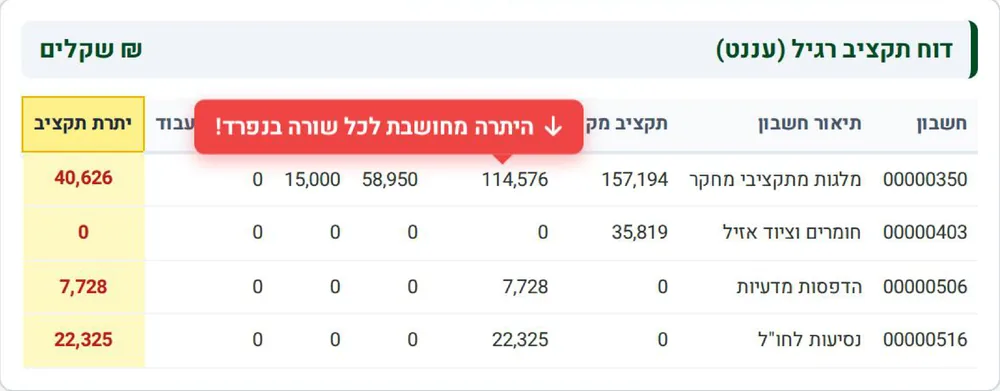
For example, in the sample ₪40,626 is left for scholarships, ₪0 for materials and ₪22,325 for travel abroad.
Don't look at the total line — In a regular budget, ignore the total line at the end of the report. Rely only on the balance of each line.Closed economy: only the total line
In a closed-economy budget there is no balance per line. The lines above only show where the money went (expenses, transfers, income).
The real balance appears only at the bottom left — on the סה"כ (Total) line, in the יתרת תקציב column (highlighted in yellow). Just like in the old system.
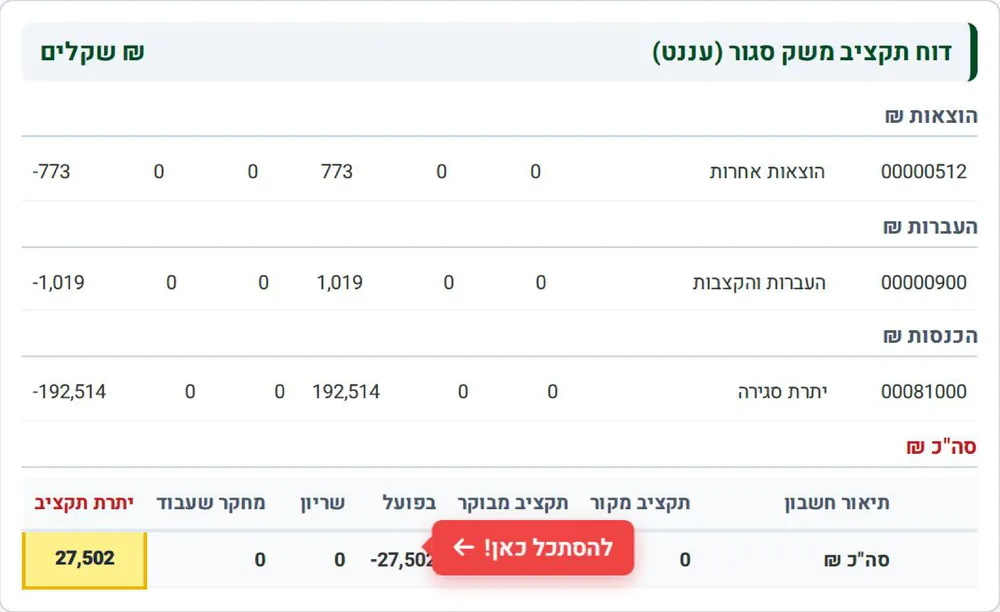
In the sample, the available balance is ₪27,502.
Foreign-currency grant: scroll down
The old system had a button that converted the whole report to foreign currency. Anant has no such button.
Instead, the top part of the report shows shekels, and below it there are separate tables in the grant's currency (for example euro). Scroll to the end of the report to see them.
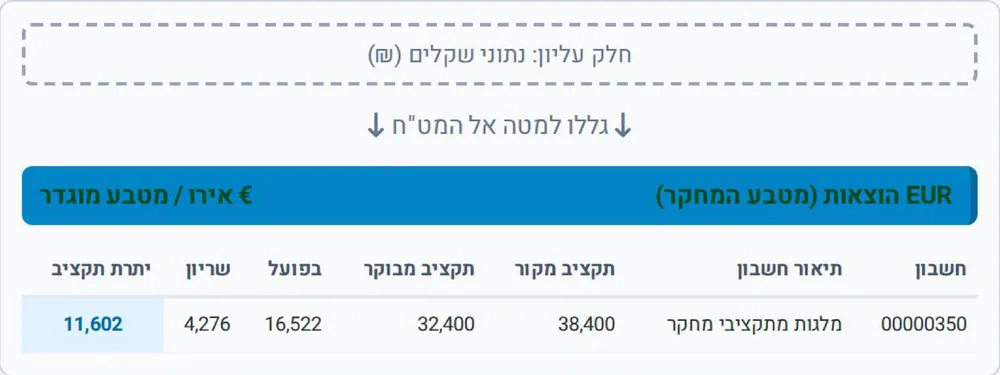 Is your grant in foreign currency? — Scroll all the way down — you'll find the full breakdown in the grant's currency there, including יתרת תקציב.
Questions? Contact the Research Authority
If a number in the report doesn't look right, open a TMR ticket to the Research Authority.
More information on the Research Authority website: research.biu.ac.il.
Updated September 2026